.

Monday, March 15, 2010

Best Joomla Plug Ins Ever


TEMPLATES
http://joomla2u.net/category/3-columns/
http://www.filesmix.com/files/info/5537b3c65980add278a9aa2e5ca77ba3/

Wednesday, October 14, 2009

Make Up Girl has 3, 000, 000 hits:)

This is a good example of a good professional Youtube video with lots of hits.
She has a sweet voice and good looks.

Wednesday, July 8, 2009

Best Places to Buy Icons for Your Professional Design Job

HEre are some of the best places on the web where you can buy Professional, modern looking icons for your professional web design job.

Icojoy - buy icons in sets. They have sets for specific vertical industries.

The Power of Drupal


Ever know what is Drupal? Ever know Obama? Well I'm sure you know Obama, the President of the United States. Drupal is a content management system(CMS) used to built websites. And guess which CMS did the Obama administration use for their US Presidency campaign. Yup, that's right Drupal.

Why did they use Drupal? Simply because its a very powerful CMS, yet its simple to use and is a very secure platform.

If you think of the size of the Obama website and the fact that Drupal is able to handle such a big, high traffic website, well that is proof of what Drupal can do.

Other high profile sites are also using Drupal. These include:
Fast Company - A very popular business magazine using Drupal.
AOL (America Online Corporate Information Website)
Yahoo Research - Yahoo is a big user of Drupal
NASA - Drupal is Big & powerful enough for SPACE
Jennifer Lopez - Many high profile celebrities use Drupal. Including JL.
Avril Lavigne - Another popular celebrity amongst the teens.
Green Peace - Big environmental & non-profits use Drupal.
End Poverty - Another big charity organisation using Drupal.
Novell - Technology professionals also use Drupal
Fox Searchlight - Big media companies use Drupal.
Lifetime Media - Another big media company using Drupal.


To learn more about Drupal, you can vist Drupal.org
You can download it too instantly, because its FREE. God bless Drupal developers.

Find Out Who Clicks on a Particular Link with Google Analytics?


Suppose I want to add a label of “customers” to any visitor who reaches my shopping cart’s receipt page. I would add an additional line of code to the Google Analytics Tracking Code (GATC) on my receipt page. It would then look something like this:


Notice the line in bold that includes _setVar. If you take a look at the code example above, you will see that I used the termcustomers,“ the label that I want to appear in the User Defined report.

When a user visits the page he will be identified as a part of the “customers” segment in the User Defined report, allowing you to perform analysis on all visitors who have purchased something from your online store. Neat, huh?


Can I use _setVar when someone clicks on a link instead of visiting a page?

Yes - you can also use the pageTracker._setVar function when someone clicks on an important link on your site, or makes a key selection on an important form that you want visitors to fill out. For example, if you wanted to add a custom label to any visitor who clicks on your “Live Help” applet, you can ask your IT department or webdesigner to add an “onClick” event, and give them the following line of code:

onClick="pageTracker._setVar('Needs Help');"

What will this look like in the end?

When all of your coding is complete, check the User Defined report after about a day or so and you should see something like this:

Saturday, July 4, 2009

How to Schedule Your Emails, Gmail & Hotmail

Read this article:
http://techblissonline.com/schedule-your-emails-from-gmailyahoohotmail-for-a-later-datetime/

You can use a service called lettermelater.com

Thursday, June 25, 2009

How to Upload Your Videos to Youtube from Your Mobile Phone?


Here are some articles that tell you how:

Using the C510 built in Youtube application:

  • From the standby screen press Menu (Figure 1).
  • In the main menu, scroll to highlight Organiser (Figure 2). Press Select.
  • Scroll to highlight Applications (Figure 3). Press Select.
  • Scroll to highlight YouTube (Figure 4). Press Select.
  • After a few seconds the phone will connect to the YouTube service. You will initially have to scroll down to choose your country for Terms of Use (Figure 5).
  • To agree to Terms of Use press Accept (Figure 6).
  • A warning about mobile data costs appears (Figure 7). Press OK to continue.
  • After a few seconds the YouTube mobile home page appears (Figure 8). Press Menu.
    In the menu that appears on the left of the screen, scroll down to highlight Upload and press Select (Figure 9), or press the number 8 on the numberpad.
    A message appears telling you that you need a username and password to log in (Figure 10). Press Login.
  • Type in your YouTube account Username (Figure 11). Press OK.
  • Type in your YouTube Password (Figure 12). Press Login. The phone starts logging in and takes a few seconds to confirm login details.
  • A list of video clips stored in your C510 appears onscreen (Figure 13). If you want to view clips to check before uploading, scroll to highlight the one you want to view and press Play.
  • After it has been played, press Back to return to the video clip list.
  • Scroll to highlight the video clip you want to upload. Press Upload.
  • The phone will start uploading the video clip (Figure 14). How long it takes will depend upon the size of the video file, and the current speed of your data connection. The longer the video clip, the bigger the video file will be, and the longer it will take to upload.
  • If the upload connection times out mid-way through the uploading process don't worry - as before, simply highlight the file, and press Upload. Highlight Resume (Figure 15) and press Select. It will continue uploading.
  • When uploading has been completed, a confirmation message appears onscreen (Figure 16). Press OK.
  • Press Back to get to the main YouTube home page. Within a short amount of time, you and others will be able to view your video clip on your YouTube account either via your PC or on your mobile phone.
  • To view your clip, in the YouTube home page scroll down to highlight My Account (Figure 17). Press Select.
  • Scroll down to highlight My Videos (Figure 18). Press Select.
  • In a few moments a gallery of your uploaded videos appears. Use the navigation D-pad forward and back keys to scroll through thumbnails of your videos (Figure 19).
  • Highlight the video you want to view. Press Play. In a few moments it begins playing onscreen. (Figure 20).
  • Press Back to return to the list, and then Home to return to the YouTube home page.
  • When you're finished using the YouTube
    Publish Post
    application, press Exit to return to the phone's
  • Applications menu. If you click on YouTube again, you may be logged in automatically, unless you choose to log out of your account. To do this, in the YouTube home page, press Options, highlight Logout and press Select. A message appears asking if you want to End application. Press Select.

Tuesday, June 16, 2009

Thursday, May 28, 2009

FREE Joomla Templates that work

Joomla24.com

  • Bizcity
  • Rocky Mountain Sunrise - like NCS
  • Bizrule
  • Black Zak 74
  • Blue Life - Web 2
  • Box Red451
  • Bright Mitra - Silver web 2
  • Bup Gastronomic - hotel
  • BusinessSimplicity
  • Businessonline
  • Car 1
  • Camp26 Studio
  • Centerstage - web 2
  • ChessClub - web 2 animated navibar
  • Citron - unique layout yellow
  • DD Ashy - Silver
  • DD ROyal - Pink
  • Depressivebrown - Agency style
  • Dezent-templates.de 11/2007 - green health
  • Digitaleye Beauty - pink
  • Dirtystyle - street edgy
  • Flow-Elegant - street
  • Frozen Green
  • Frozen NY
  • Funkymonkey - street
  • FV Bluesky - business
  • FV Business Blue
  • Grey House - Real estate
  • Hitech Design
  • Hyperglass - web 2 like skype
  • JA Sabina - bright
  • JM Medical
  • JM Robotic
  • Joomblog Green
  • mambaholic
  • MBT Business 2 - flash
  • MBT Shopping
  • Mitra Global - medical
  • Mitra Dating
  • Modernportal v2
  • Modernview J1.0
  • Modxorange
  • MP Anzio2
  • MP Anzio
  • Moz Dev
  • MS Opacity - unique
  • mody space
  • OTSMuzic J1.0
  • rainbow - agency
  • recipes
  • redflystudios
  • Red Evolution Two - biz
  • Red Evolution 30 - biz
  • sabana_plazza
  • Rouge 08
  • sbspartan - property

LINKS

Saturday, May 23, 2009

Kris Allen wins Americal Idol 2009. Now who has the better website?

Congratulations to Kris Allen who had just won American Idol 2009. From a student to a Superstar. Now that's a story. He beat Asam Lambert to win the American Idol crown.


Kris has a fan website(not sure if its his official site) at krisallenation.com. Guess what its hosted on blogger. Same as us buddy. Guess the site creator knows, they're gonna get a ton of traffic and wants to save on bandwidth costs, so they decide to use blogger. Smart move. Put all the traffic burden on Blogger.

Adam Lambert has a website at adamlambert.org

Now here's the question. Who has the better website?

We can compare the 2 websites in terms of design and functionality.

Both websites use a blog tpye layout. Design wise I think the Adam Lambert website is better designed. It looks more edgy and cool.

Function wise, both is about the same. But overall the Adam Lambert site has my vote.

Post your views in my comments section.

Friday, May 22, 2009

Free Joomla Template Sites

LINKS TO FREE JOOMLA TEMPLATE SITES

The Best Premium Joomla Templates

LINKS

COMPONENTS

VIRTUEMART

LINKS

Tuesday, May 19, 2009

The Best Free Wordpress Themes with Web 2.0 Designs

LINKS

THEMES

  • Avada
  • Magazeen - Like MTV and apple combined
  • Options WordPress Theme - dark colour good for entertatinment media sites.
  • “Branford Magazine” WordPress Theme - good for corporate sites. Has drop down menus.
  • Mimbo Magazine Theme - good for elegant look. Has sub - sub categories
  • ByPress -
  • News Magazine - With picture gallery & email subscriber ready
  • Sliding Door - Unique
  • Make Money Online - Got videos, can do like youtube with sub categories
  • CorporateMag - With animated graphics & tag cloud & ajax comments.
  • GraphPaperPRess
  • Arthemia
  • atriumax - with tv banner image slider
  • Online Casino Template 38 - with tv banner image slider, silver
  • Online Casino Template 42 - with tv banner image slider, blue
  • Magazine Star - with tv banner image slider

Saturday, May 9, 2009

Best Tools to use when running your Website Business

We would like to collect from our readers some of the best tools that they use to run their website. Add your collection on the comments.

  • Spyre Studios has a great article at http://spyrestudios.com/tools-web-design-business. Check out MAMP Pro tool for running MYSQL & PHP locally, its cool.
  • The Freelance Folder is a good site that teaches how you can market yourself as a freelancer.
  • CodeThatMenu is advanced cross-browser state-of-art JavaScript menu control that can be easily integrated in any web page, requires no JavaScript knowledge from the prospective user and comes with the features everybody expects from the modern navigation menu. Builder, FAQ, forum, complete howto gets you going instantly.

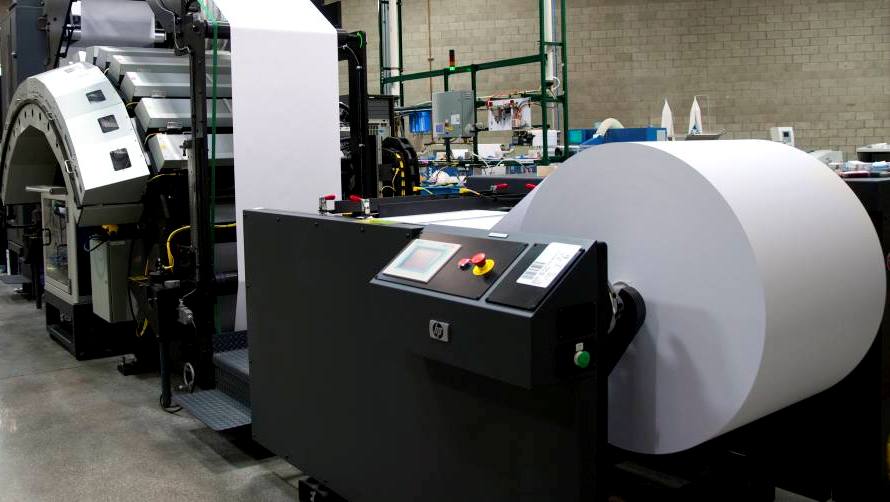
HP Showcases World’s First High-Speed, 30” Digital Color Press

PRESS RELEASE

May 2009

HP has announced developments for its HP Inkjet Web Press platform to help print service providers (PSPs) become more profitable and accelerate their transition from analog to digital printing.

On show at an open house event at Los Angeles-based O’Neil Data Systems–site of the first HP Inkjet Web Press beta installation–the press demonstrates how customers can benefit from market-leading total cost of ownership, excellent productivity and a high level of quality.

Bolstering HP’s efforts to target the $3 billion digital print market opportunity for publishing in 2010, as well as the $13 billion market opportunity for direct mail, transactional and transpromotional printing in 2010, the HP Inkjet Web Press offers:

Addressable printing resolution of 1,200 x 600 dots per inch (dpi) at a full press speed of 400 feet per minute–an industry first for high-volume continuous-feed inkjet production platforms–using the latest generation of HP Thermal Inkjet printheads based on HP Scalable Printing Technology.

Compatibility with a wide range of media types and weights, including uncoated offset stock, newsprint, and treated and coated papers.

Additional information about the productivity and quality advantages offered by the HP Inkjet Web Press are the focus of two new white papers. The white papers, as well as additional details from the open house event at O’Neil Data Systems, are available at http://www.hp.com/go/IHPSopenhouse.

web hosting reviews

Top 3 Web Hosting for Designers

Our reviews of the best web hosting providers for Designers.

Rank Features Features Extra Features Web Hosting Review
1
HostRocket
Many Features

Disk Space: Unlimited
Bandwidth: Unlimited
Email Accounts: Unlimited

MySQL Databases: Unlimited
FTP Accounts: Unlimited
- Streaming audio/video capabilities
- Ready to go scripts:
E-commerce, gallery, forums etc


HostRocket
Review
Email in your review
2
WebHostingPad
Reliable Host

Disk Space: Unlimited
Bandwidth: Unlimited
Email Accounts: Unlimited

MySQL Databases: Unlimited
FTP Accounts: Unlimited
- Ready to go scripts:
E-commerce, gallery, forums etc
- $25 Google Credit - Advertise on google. They give you $25 credit

- $25 Yahoo Credit
WebHostngPad
Review
Email in your review
3
Globat
Reliable Host

Disk Space: Unlimited
Bandwidth: Unlimited
Email Accounts: Unlimited

MySQL Databases: Unlimited
FTP Accounts: Unlimited
- $4.44 One of the cheapest
- You get FREE Domain too
- $30 Google AdWords Marketing Credit
- Ready to go scripts:
E-commerce, gallery, forums etc

Globat
Review
Email in your review